Analysis
Composer vs Surmount: Which Automated Trading Platform Actually Wins in 2026?
If you are a self-directed investor, you know that the "buy and hold" mantra of the last decade is no longer enough to navigate today’s volatile markets. With all the shocks the markets and global economy have faced recently, active management is becoming a necessity rather than a choice.
To stay ahead, many are turning to algorithmic tools to execute precise, emotionless strategies. This leads to a common crossroads: Composer vs Surmount. This comparison is specifically for the modern investor who wants to automate their portfolio but is torn between a "walled garden" brokerage and a flexible, multi-broker automation layer. Whether you are looking to migrate your existing "Symphonies" or build your first AI-driven model, understanding how these two platforms differ in execution and asset support is critical to protecting your capital in 2026.
Quick Verdict: Surmount vs Composer
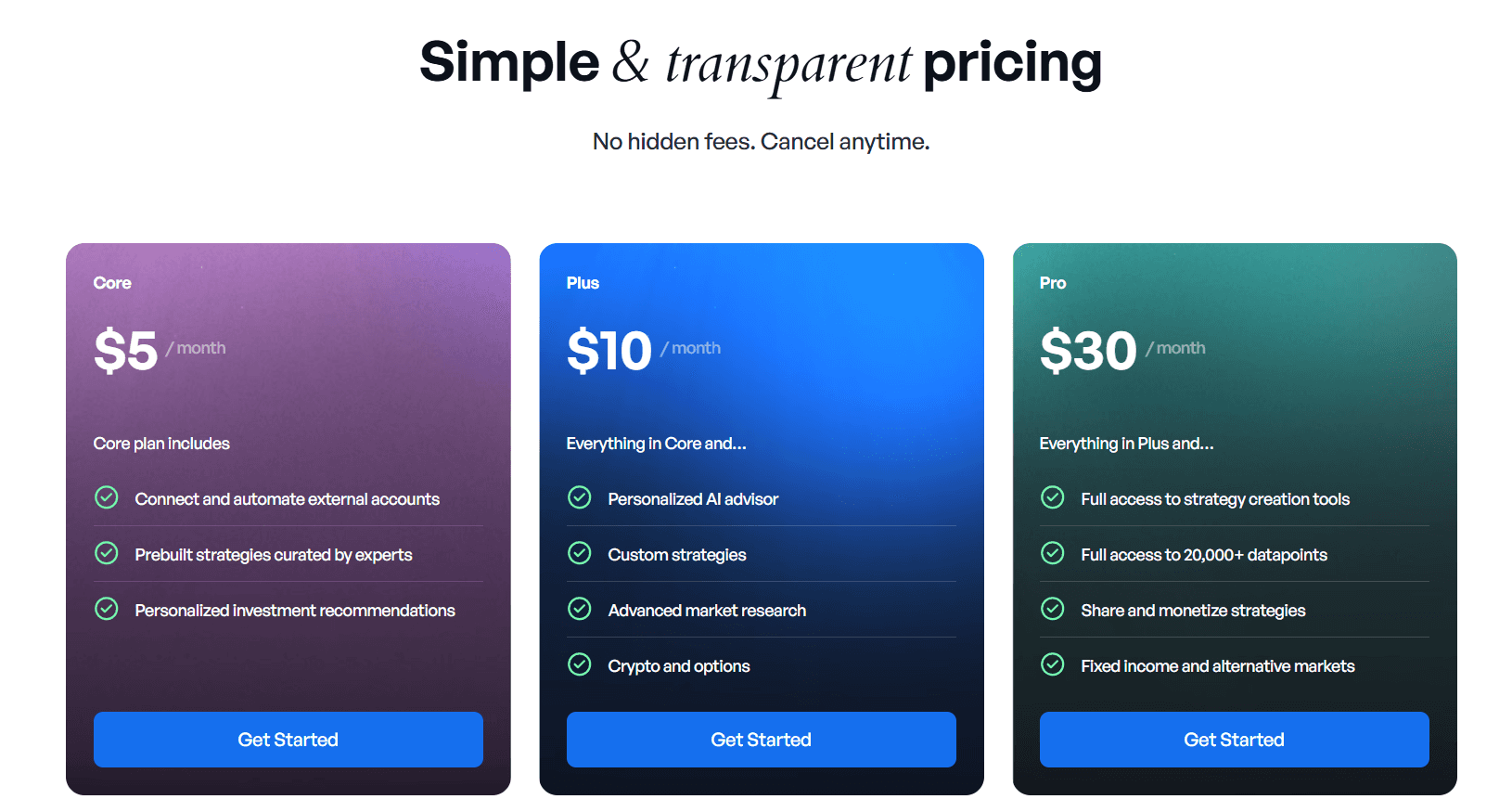
The choice between the two often comes down to the balance of control versus convenience. Surmount is the more comprehensive and cost-effective option, offering AI-driven tools and full-code flexibility for $10/month.
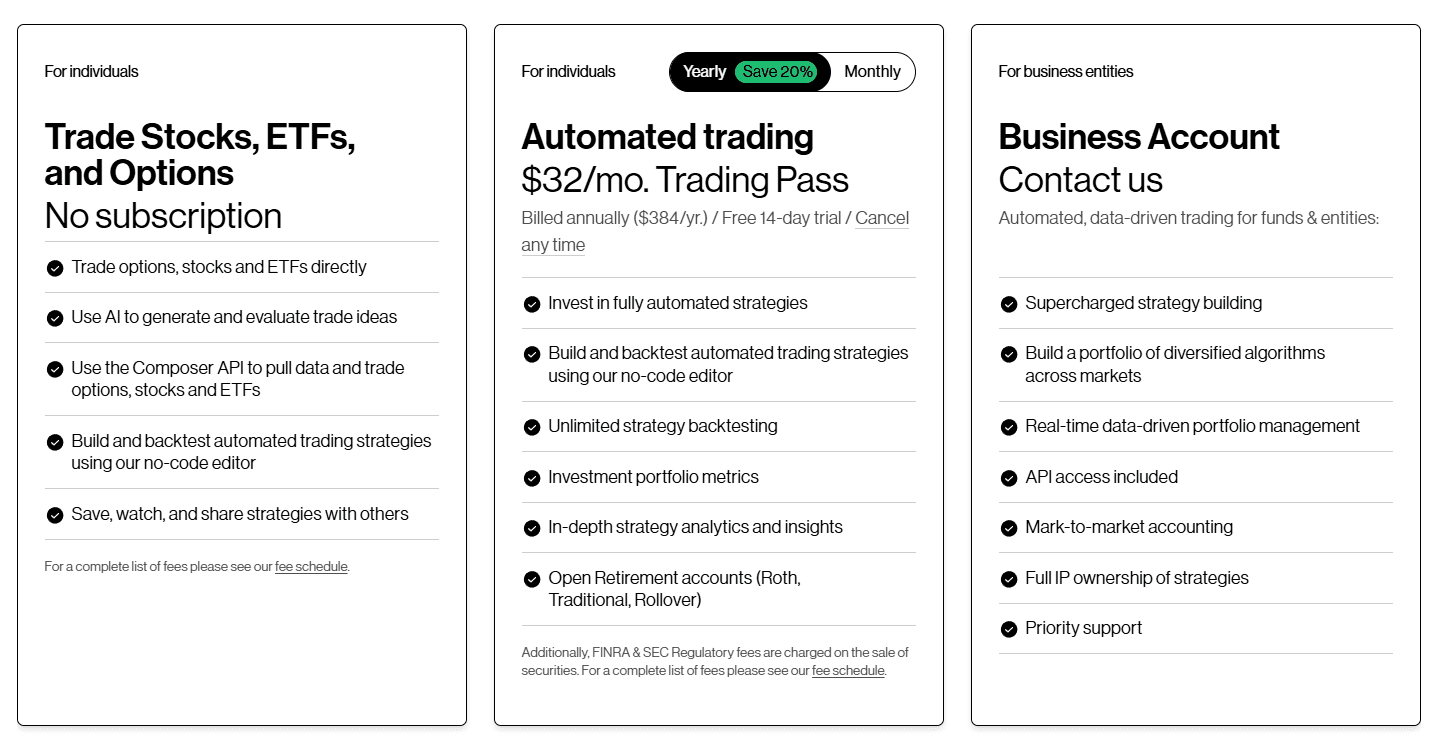
Composer is a streamlined, premium environment ($32/month) best suited for retail investors who want a dedicated, no-code "walled garden" for manually crafting logic-based portfolios.
Feature | Surmount | Composer |
Monthly Cost | ~$10 | ~$32 |
No-Code Builder | Yes (Drag-and-Drop) | Yes (Symphony Editor) |
AI-Driven Tools | Yes (AI Strategy Builder) | Limited |
Full-Code Option | Yes | No |
ETF Customization | Yes (Custom ETF Builder) | No |
Backtesting | Yes | Yes |
Support | 24/7 Support | Standard |
Asset Support | Stocks, ETFs, Crypto, Fixed Income | Stocks, ETFs, Options |
Composer Deep Dive: The Logic-Based Specialist
Composer revolutionized the space by turning quantitative finance into a "Symphony." It treats trading like a flow chart, where every move is dictated by a logical "if-then" chain.
What it’s good at:
The "Symphony" Editor: This is their crown jewel. It’s a clean, block-based interface that feels more like building with Legos than managing a brokerage. It’s arguably the most aesthetic no-code tool in fintech.
Rapid Iteration: Because the backtester is baked directly into the builder, you can change a single parameter (like switching a 20-day MA to a 50-day MA) and see the historical impact almost instantly.
Community & "Hedge" Features: Composer has a very strong social element. You can browse a library of user-created strategies, "hedge" (copy) them into your own account, and tweak them. It’s perfect for those who want a starting point rather than a blank canvas.
Who it’s for:
The Quantitative Hobbyist: Investors who have a specific set of rules in mind but don't want to manage the manual execution or learn Python.
ETF-Focused Traders: It excels at rotation strategies (e.g., moving between SPY and BND based on market volatility).
Limitations:
The "Walled Garden": To use Composer’s automation, you have to use their brokerage. You cannot automate your existing Robinhood or Fidelity accounts through their interface.
Limited Asset Variety: While they’ve added options, it’s primarily a tool for US equities and ETFs. If you want to automate a portfolio of Gold, Bitcoin, and Treasury bonds, you’ll find the options restrictive.
No "Escape Hatch": There is no way to write custom code. If the visual blocks can't do what you want, you’re out of luck.
Surmount Deep Dive: The All-in-One Automation OS
Surmount is a distinct ‘Composer alternative’ that is essentially built as a modular "layer" that sits on top of your existing financial life. It’s designed to be more expansive, offering tools that cater to both the "set-it-and-forget-it" investor and the hardcore developer.
What it’s good at:
The AI Strategy Builder: This is a major differentiator. You can describe a strategy in natural language—"I want to buy undervalued semiconductor stocks whenever the VIX is below 20"—and the AI generates the logic for you. It removes the "blank page" syndrome for new traders.
Cross-Broker Connectivity: Surmount is "broker-agnostic." You can link accounts from Robinhood, Interactive Brokers, Coinbase, and others. This allows you to manage your entire net worth’s automation from one dashboard.
The "Full-Code" Option: Surmount doesn't cap your growth. You can start with no-code or AI, but if you eventually want to write custom Python scripts for high-frequency or complex trades, the platform provides a full-code IDE.
Custom ETF Creation: Beyond just trading, Surmount allows you to build your own "Personal ETF," essentially creating a diversified, custom fund that automatically rebalances.
Who it’s for:
The Diversified Investor: Anyone who holds assets across multiple platforms (Stocks + Crypto) and wants a single brain to control them all.
The "Evolving" Trader: Someone who wants the ease of AI today but wants the option to learn and use "Full-Code" customization tomorrow.
Cost-Conscious Quants: At ~$10/month, it offers a deeper feature set (AI + Code + ETF Builder) for less than the competition.
Limitations:
Connection Management: Because Surmount connects to external brokers via API, you are responsible for maintaining those connections (e.g., re-linking if a token expires), which is a slight trade-off for the flexibility it provides.
Learning Curve: Because there are three ways to build (AI, No-Code, Full-Code), the dashboard has more "knobs and dials" than Composer, which might feel slightly more complex during the first 30 minutes of use.
When to Choose Composer vs. When to Choose Surmount
Deciding between Composer vs Surmount depends on how much control you want over your "tech stack" and how you prefer to build your investment logic. While both aim to democratize quantitative trading, they serve two distinct investor profiles.
Choose Composer if...
You want a "Walled Garden" experience: If you prefer your brokerage and your automation tool to be the same entity, Composer is the choice. You don’t have to worry about API keys or connecting third-party accounts; you simply deposit funds and trade.
You enjoy manual logic building: If your idea of a fun Sunday is manually dragging and dropping "if-then" blocks to create a complex "Symphony" from scratch, you will appreciate Composer’s polished, tactile interface.
You focus strictly on No-Code: If you have zero intention of ever looking at a line of Python and want a platform that is 100% committed to a visual-only workflow.
You prioritize a social ecosystem: Composer has a strong community-sharing aspect, making it easy to browse, "hedge," and follow strategies created by other retail investors.
Choose Surmount if...
Value and cost-efficiency are key: At $10/month (compared to Composer’s $32), Surmount offers a more robust feature set—including AI and full-code options—at a lower price point.
You want to keep your current broker: If you already have your capital at Robinhood, Interactive Brokers, Coinbase, or Alpaca, Surmount acts as the "brain" on top of those accounts. You don't need to liquidate your positions or move your money to a new firm.
You want AI to do the heavy lifting: If you have a strategy idea but don't want to manually build out every logic branch, the AI Strategy Builder allows you to simply describe your goal in plain English to generate a working model.
You need "Room to Grow": Surmount is the only platform of the two that offers a Full-Code option. This means you can start with No-Code or AI, but as you become more advanced, you aren't capped by the limitations of a visual editor.
You are a Multi-Asset Investor: If your portfolio includes Crypto, Fixed Income, or Custom ETFs, Surmount’s infrastructure is built to handle these diverse asset classes in a way that Composer’s equity-centric model currently doesn't.
How to switch from Composer to Surmount (step-by-step)
Transitioning your automated portfolio doesn't have to be a technical headache. If you’ve been weighing the Composer vs Surmount debate and are ready to move toward a more cost-effective, AI-driven environment, follow this structured migration path.
Step 1: Evaluate and Document Your Composer Logic
Before closing your tabs, you need a clear blueprint of what you’re moving.
Analyze Performance: Review your active and historical "Symphonies" in Composer. Identify which strategies delivered the best risk-adjusted returns and which are candidates for retirement.
Document Key Parameters: Record the specific logic that powers your trades. Note your asset classes (e.g., QQQ, TMF), rebalancing frequency, and technical triggers like VIX levels or moving average crossovers.
Pause Active Positions: To avoid the complexity of managing two different automation engines simultaneously, consider winding down your active positions in Composer. This provides a "clean slate" for your capital to move into your new setup.
Step 2: Configure Your Surmount Infrastructure
Once your data is documented, it’s time to build your new "command center."
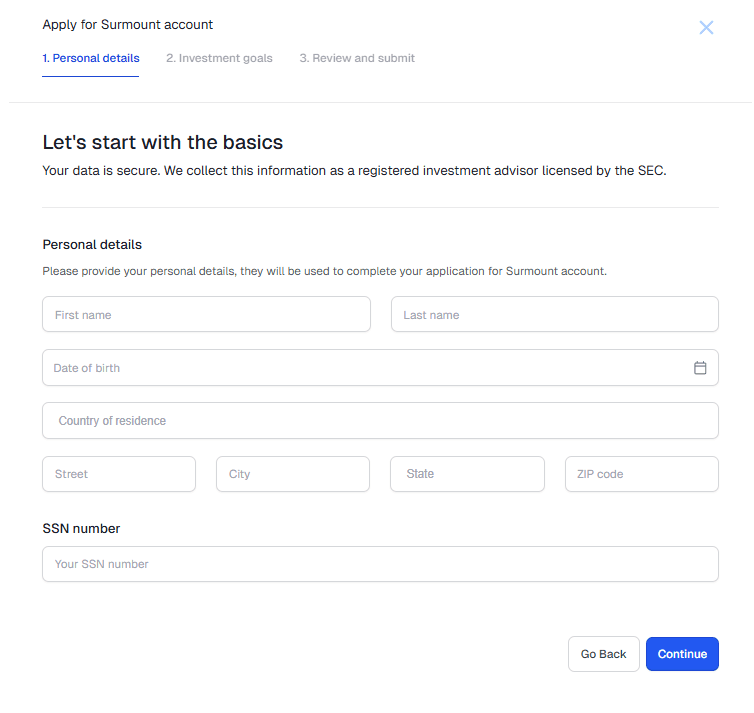
Sign Up: Create your account on the Surmount website.
Connect Your Brokerage: Unlike a closed system, Surmount acts as an automation layer. Link your preferred broker (such as Alpaca, Interactive Brokers, or Robinhood) to enable seamless execution.
Define Risk Parameters: During onboarding, use Surmount’s built-in tools to set your risk tolerance and long-term investment goals. This ensures the platform’s AI stays aligned with your personal financial boundaries.
Step 3: Recreate and Optimize Your Strategies
Now, transform your documented logic into live Surmount strategies.
Utilize the Custom ETF Builder: Use Surmount’s intuitive ETF Builder to replicate the diversified, rules-based funds you previously ran in Composer.
Leverage AI Insights: This is where you gain an edge. Use Surmount’s AI-driven insights to refine your old strategies. The AI can suggest optimizations—such as better entry signals or more efficient asset pairings—that go beyond manual logic-building.
Rigorous Backtesting: Before committing live capital, run your recreated strategies through Surmount’s backtesting engine. This validates that your logic performs as expected under historical market conditions.
Step 4: Capital Transition and Activation
The final step is moving from theory to live execution.
Transfer Funds: Move your capital from your old brokerage setup to the account you’ve connected to Surmount.
Deploy Your Strategies: With your funds in place and your backtests verified, toggle your strategies to "Live."
24/7 Peace of Mind: If you hit any snags during the migration, leverage Surmount's 24/7 support. Unlike standard retail support, this team is specifically equipped to help with the technical nuances of automated transitions.
Frequently Asked Questions
Is Composer free?
Composer offers some free elements like manual trading, but the automated execution and advanced backtesting typically require the $32/month subscription.
Does Surmount have a strategy builder?
Yes. Surmount offers a "Triple-Threat" building experience: a No-Code drag-and-drop builder, an AI-powered natural language builder, and a Full-Code IDE.
Which is better for crypto?
Surmount is generally the preferred choice for multi-asset traders, as it offers native support for crypto brokerage connections that Composer currently lacks.
Can I build my own ETFs?
This is a core feature of Surmount. Their Custom ETF Builder allows you to group assets together into a single, automated fund. Composer does not currently offer a dedicated ETF customization tool.
Take the Next Step in Your Trading Journey
Don't let high fees and limited tools hold back your returns. Whether you want to build from scratch or let AI do the heavy lifting, the future of your portfolio is automated.
Automate any portfolio using data-driven strategies made by top creators & professional investors. Turn any investment idea into an automated, testable, and sharable strategy.